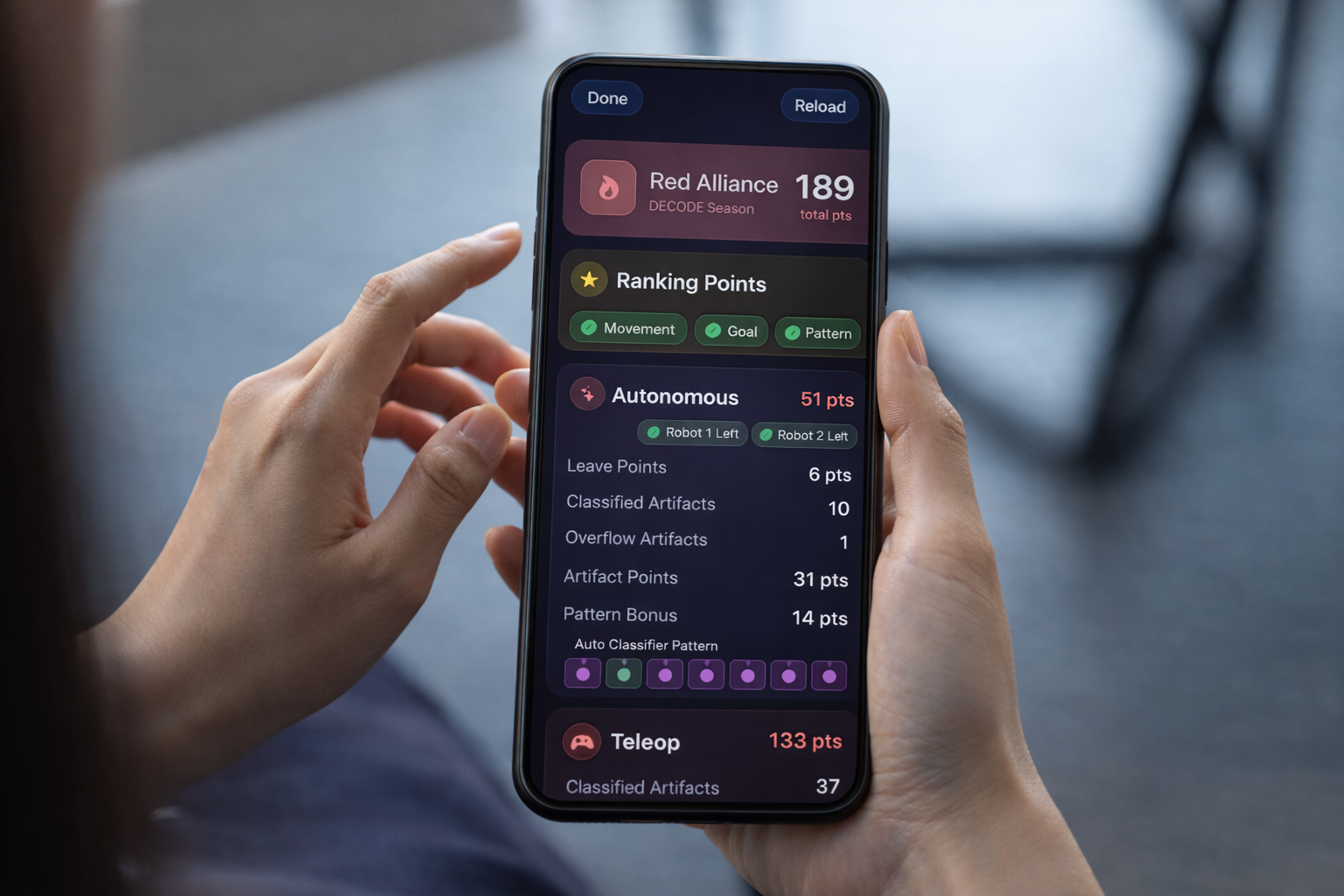
FTC Tracker is a free iOS app built specifically for FIRST Tech Challenge competitors, coaches, and volunteers. Whether you're attending your first qualifier or running a full scouting operation at a championship, this guide walks through how to get the most out of the app on competition day.
Before your next event, download FTC Tracker on the App Store.
App Overview
FTC Tracker is organized into four main tabs:
- Teams — Search any FTC team by number or name, see season stats and awards
- Events — Browse and follow upcoming and current events
- Scouting — Your custom scouting notes and templates
- Rulebook — AI-powered FTC Game Manual assistant
Let's walk through each in context of a real competition day.
Finding Your Event
Open the Events tab and search by event name, state, or city. You can also browse upcoming events in your region by date.
Tap any event to see:
- Full team list with season OPR and rankings
- Live match schedule and results
- Current standings with ranking points and tiebreaker
- Detailed match breakdowns with auto, TeleOp, and endgame scores separated by game element
FTC Tracker pulls data directly from the official FTC API, so the rankings and scores are as accurate and up-to-date as the official scoring system at the venue.
Following Live Match Results
During the competition, the Rankings view updates continuously. You can track:
- Team standings with ranking points and TBP
- OPR for every team (updated after each match)
- Upcoming match schedule so you know who plays next
- Individual match results with full score breakdowns
Tap any match to see the detailed scoring breakdown — you'll see exactly how each alliance scored their autonomous, TeleOp, and endgame points, broken down by game element for the current season. This level of detail is invaluable for understanding a team's actual capabilities before you scout them in person.
Taking Scouting Notes
The Scouting tab is where FTC Tracker really earns its place on your phone.
Creating a Scouting Template
Before your event, create a scouting template with the exact fields your team needs. FTC Tracker supports:
- Text — open-ended observations
- Number — counting (e.g., "Auto samples scored")
- Boolean — yes/no flags (e.g., "Attempts endgame hang?")
- Rating — 1–5 star scores for overall impression
- Choice / Multi-choice — categorical options
Your template is reusable across every event all season. Build it once, use it everywhere.
Recording a Scout
During a match, open any team's profile and tap Add Note. FTC Tracker shows your template fields ready to fill in. You can attach the note to a specific event and add tags for easy filtering later.
Voice Scouting (Pro): If you have FTC Tracker Pro, tap the microphone button to dictate your observations hands-free while watching the match. The AI transcribes your speech and fills in template fields automatically — no eyes-off-field required.
Reviewing and Searching Notes
After a day of scouting, your notes are fully searchable. Filter by:
- Team number — see everything you know about a specific team
- Tag — "strong auto," "defensive," "reliable," etc.
- Event — see notes from a specific competition
- Keyword — free-text search across all note content
This makes alliance selection research fast: search "hangs level 3 reliable" and instantly see every team you marked that way.
Comparing Teams
Before alliance selection begins, use the Compare tool to evaluate teams side by side. Tap the compare icon from any team profile and add 2–6 teams to the view.
You'll see each team's stats, rankings, OPR, and awards together in one layout — making it easy to spot which teams complement your capabilities and which to prioritize.
FTC Tracker Pro expands the comparison to 6 teams simultaneously, which is useful when you're ranking your full list of potential picks before the selection meeting.
Using Rulebook Chat AI
The Rulebook tab gives you an AI assistant trained on the official FTC Game Manual.
Type or speak any question naturally:
"Can a robot touch the submersible during endgame while our alliance is hanging?"
"What's the penalty for contacting an opponent robot during autonomous?"
The AI responds with the relevant rule text, page references, and a plain-language explanation. Streaming responses (Pro) make it even faster.
This is especially useful:
- When you see a controversial play in a match and want to check the rule immediately
- When preparing to talk to a referee about a potential violation
- When studying the game manual before your first event of the season
Note: Rulebook Chat is an educational tool. For official rulings at a competition, always consult a head referee directly.
Team Spaces (Beta)
Team Spaces lets your entire scouting team share notes in real time — no accounts required.
Create a space at the start of your event and share the join code with your scouts. Every note added by any team member appears immediately for everyone in the space. This eliminates the "collect everyone's paper forms" step that slows down post-match analysis.
Team Spaces works on both the iOS app and the web at spaces.ftctracker.org.
FTC Tracker Pro
Most features in FTC Tracker are completely free. Pro ($1.99/month) unlocks:
- Unlimited AI voice scouting
- Advanced analytics and performance insights
- Compare up to 6 teams simultaneously
- Streaming Rulebook Chat responses
- Offline rulebook access for venues with poor Wi-Fi
For teams that take competition prep seriously, Pro is worth it — particularly the voice scouting, which dramatically increases how many matches your scouts can cover.
Event-Day Checklist
Here's a quick checklist for putting FTC Tracker to work at your next competition:
Before the event
- Build or update your scouting template
- Find your event in the app and bookmark it
- Set up a Team Space and share the join code with your scouts
- Download the rulebook offline if your venue has spotty Wi-Fi
During practice matches
- Take preliminary notes on teams you expect to face in eliminations
- Visit pits and supplement your app notes with direct observations
During qualifications
- Assign 2–3 teams per scout per match
- Check live rankings after each match to reprioritize your scouting targets
- Cross-reference your notes with match score breakdowns in the app
Before alliance selection
- Use the Compare tool to rank your top picks
- Search your notes for priority criteria ("consistent auto," "reliable hang," etc.)
- Agree as a team on your first, second, and third choices before the meeting
FTC Tracker is free to download and gets more useful with every event you bring it to. Download it, run through the setup with your team before competition day, and you'll walk into alliance selection with a real information advantage. Check out our scouting guide for tips on how to structure your data collection.